LLMs Can Do Everything, but Should They?
A field worker walks up to a pole ...
Like any good joke, a project needs a little bit of backstory. Here at dymaptic, we often push the boundaries of what AI can do, but it’s good to remember you don’t always need a large language model from a frontier lab like Anthropic.
For this project, we were presented with an interesting problem: we wanted to extract the serial number off a utility pole into an app.
Why Was Dymaptic Testing AI on Utility Pole Serial Numbers?
The workflow before we started working on this was basically:
- A field worker walks up to a pole (there’s a joke in there…)
- Types the serial number on the pole into the app
- Waits for the app to load
- Takes a picture of the pole
- Fills out the current condition, or edits other pole attributes as needed.
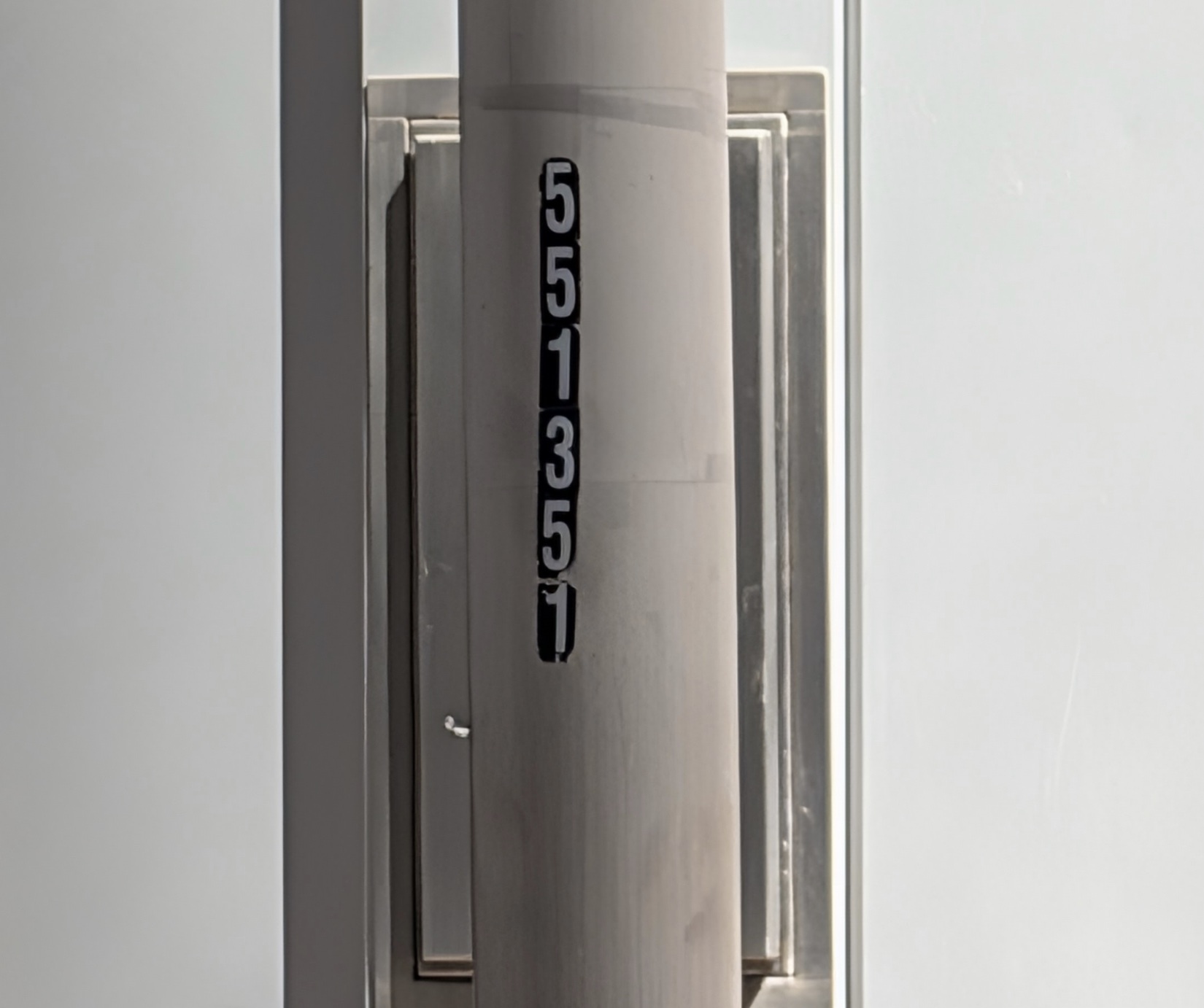
That’s not a bad workflow, but maybe we could reduce the typing a bit by combining the “take a picture” and the “typing of the serial number” into one step? After all, people are pretty reliable at typing in those numbers: 551351; there, I almost did it without looking at the image!
When I tried that just now, it took maybe 6 seconds, so let’s call that 4 to 6 seconds of typing on average. If we could combine that into the picture step and make it less than two seconds… across 1000 pole inspections, that’s about 67 minutes saved, and probably some lives improved.
Can a Large Language Model Read a Pole Serial Number Fast Enough?
Our default these days is to turn to an LLM (usually Anthropic’s Claude) and ask it to try:
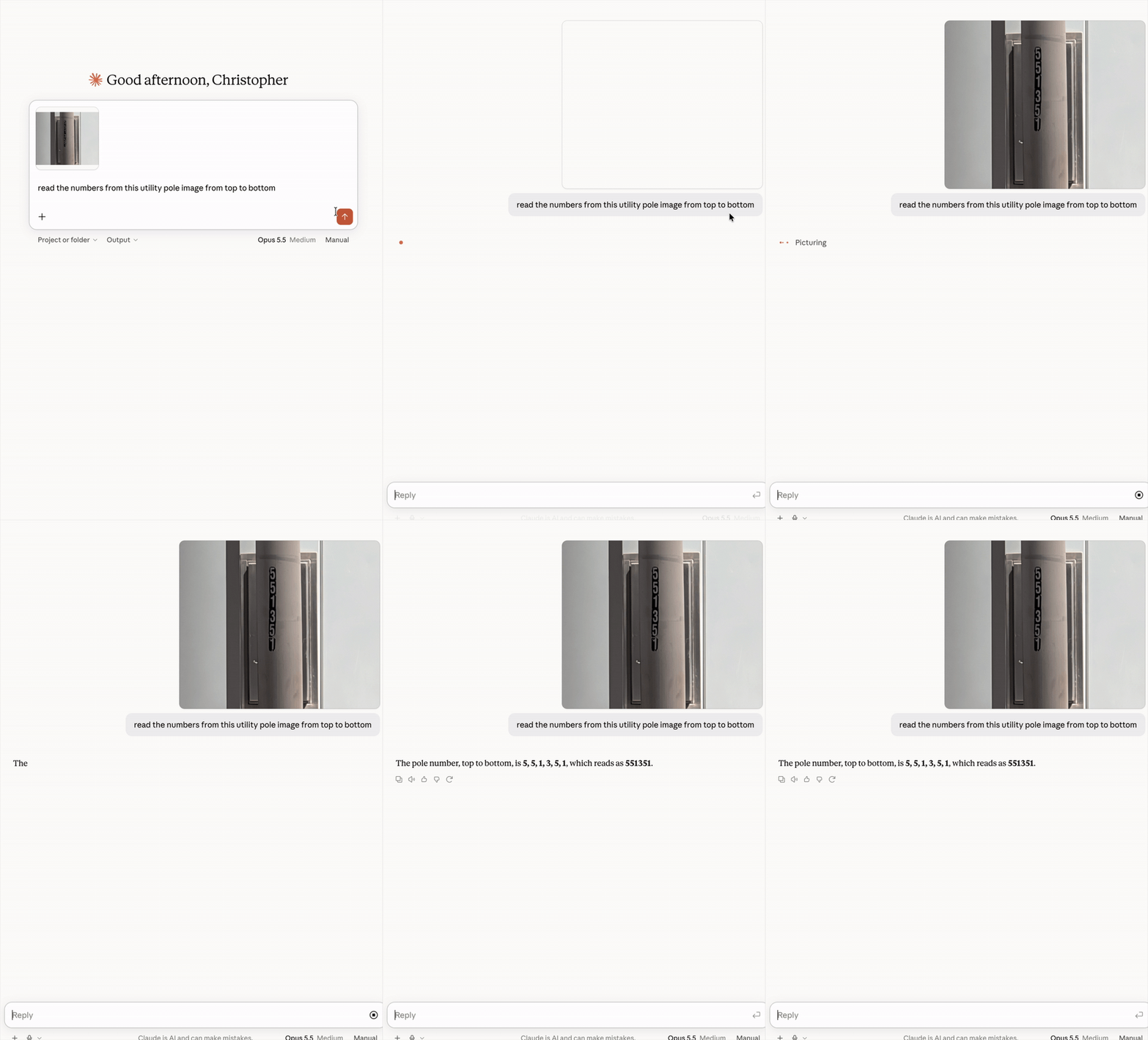
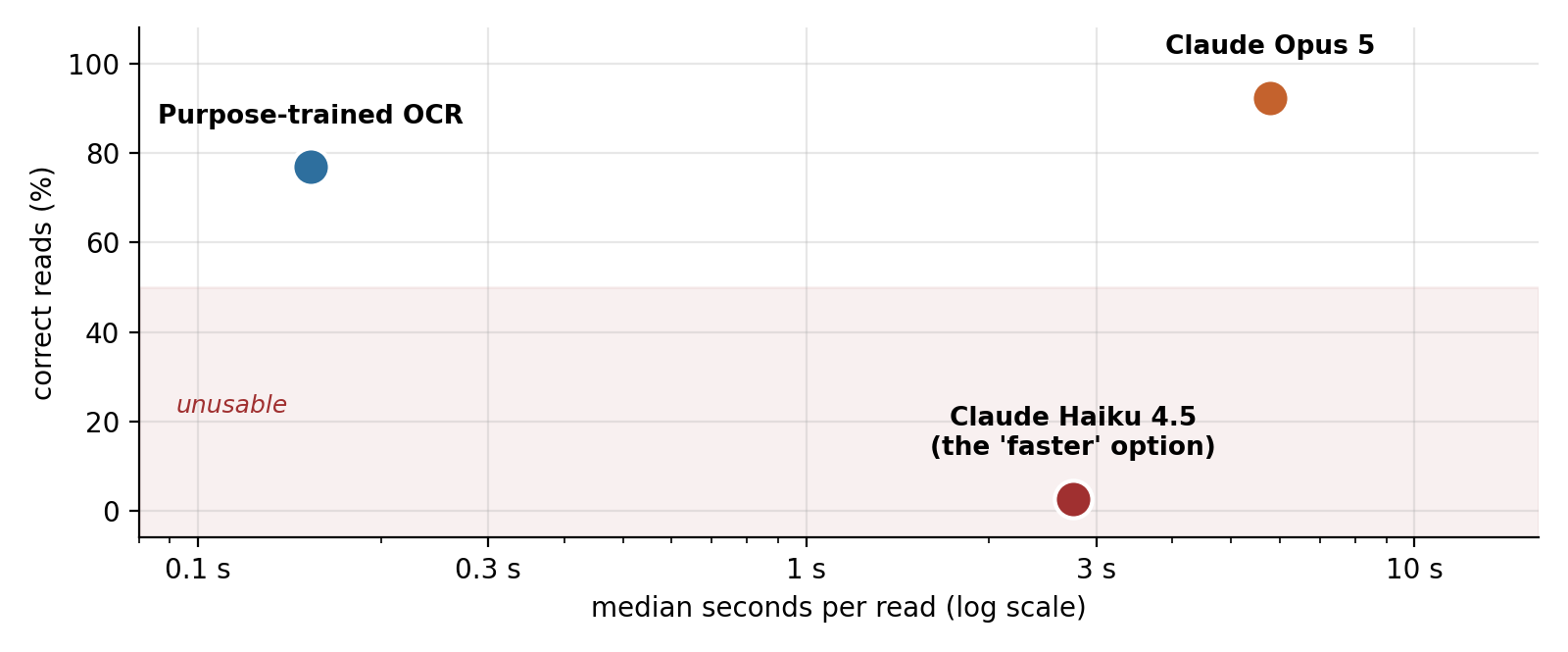
That single try took Opus 5.5 about 2.4 seconds. But across a wider set of 39 photos in our test harness, Opus 5 had a median of 5.8 seconds, with some up to 11.7 seconds.
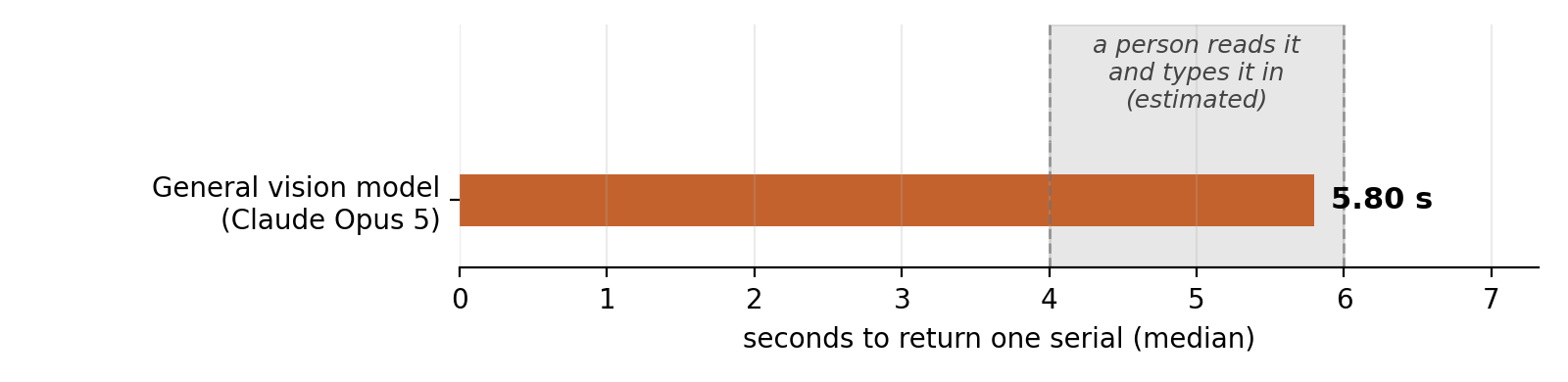
At this point, we realized we weren’t really going to save any time, and in the field, network latency could make it take even longer. So, instead, we took a look at running a small, fit-for-purpose model, a classic “OCR,” if you will.
How Does Tesseract OCR Compare to Claude Opus 5?
OCR, or Optical Character Recognition, dates back to the 1920s and 30s. Folks have long tried to build automated systems that can read text.
💡 Did you know that reCAPTCHA, the version of CAPTCHA most of us remember, was actually using humans to validate OCR text? It would give you two words; it knew one of them and used that to confirm you were human. The second word was OCR’d, and the humans typing it in were looking at the original word and typing what it said to help fix text OCR couldn’t read!
This utility pole serial number fits what OCR can do really well. There are ten possible digits (0-9) in a stenciled font that is blocky and easy to read, in a consistent orientation and printed on a label designed to be high-contrast. This was basically the best possible scenario for OCR success.
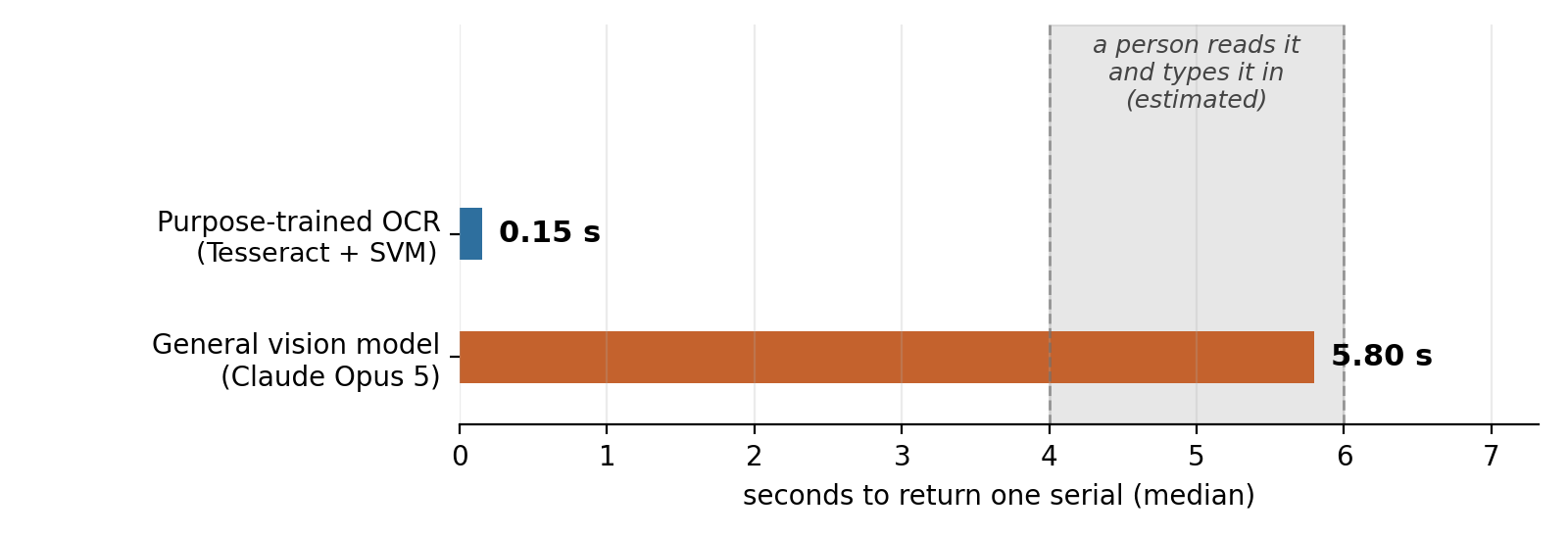
We decided on the open-source OCR tool, Tesseract. It is probably the most popular, if not the best, open-source OCR tool available right now. We ran it on a set of 39 images and ran Claude’s Opus 5 on the same set from a simple Python harness that timed both the same way. Here’s how the stats came out.
| Purpose-trained OCR Tesseract 5.5.3 + SVM |
General vision model Claude Opus 5 | |
|---|---|---|
| Correct reads | 30/39 (76.9%) | 36/39 (92.3%) |
| Median time | 0.15 s | 5.80 s |
| Fastest / slowest | 0.09 s / 0.71 s | 3.92 s / 11.72 s |
| Local CPU time | 146 ms | 2 ms |
| Time spent waiting | none | 5.79 s |
| Cost per 1,000 reads | $0 | ~$5 |
| Works offline | yes | no |
Why Did Speed Matter More Than Accuracy?
If you look at the accuracy numbers here, you’ll see that Tesseract was worse than Claude Opus 5, but our original problem wasn’t being more accurate than a human, it was being faster than one. Fast enough to save time in the field.
We also tried to speed up the general model by using a smaller version, in the case of Anthropic, that means Haiku. But the accuracy dropped significantly. Haiku got literally one image correct. Just one. It dropped so far, and was still so slow that it just didn’t make sense at all to leverage that model.
We even went further and tried some other, even smaller OCR models, but accuracy fell off very quickly, with things like repeated digits happening frequently, likely because of the vertical nature of the label instead of the typical horizontal text that OCR models are trained on.
Tesseract was our winner: the combination of speed and accuracy and running on our own hardware just beat out the more accurate (but 40x slower) Opus. On top of Tesseract, we also added a “Support Vector Machine” (SVM) classifier to fill the gaps when the Tesseract model was not confident enough about its read. That SVM was trained on a set of sample images that one of us took while walking around a city. But the details of that are for another blog!
When Is a Frontier Model Like Claude Opus the Better Fit?
Tesseract is AI too! Tesseract is an open-source OCR engine. It was originally built by HP in the mid-80s, open-sourced in 2005, and was sponsored by Google from 2006. It is now community-maintained and Apache-licensed, making it perfect for embedding into custom systems like what we were building for our client.
It has also been updated frequently over the years; since 2018 it runs on a small neural network (an LSTM) that does this one thing well.
Interestingly, the big frontier model (Opus 5) was better at the task overall, just not faster. It is fascinating that a model trained to be so generic could be so good at a narrow task like this. I would even wager that Opus is better at this than humans are, over thousands of reads. We humans do make mistakes too, but it is often hard to see just how many we do make on these repetitive data entry tasks because we so highly trust other humans to be correct.
Big models like Opus 5 are perfect for testing. They require no setup, and as you can see in the GIF above, it took Christopher seconds to drop an image in and get output. That makes them a quick way to find out whether AI can do the job at all, before you decide which AI should.
Our custom OCR service makes a mistake on about 1 in 4 reads. In our initial test data, of the 9 it got wrong, the big vision model (Opus) read 7 of those correctly. So if we needed a solution that was more focused on accuracy instead of speed, the larger model would be a better fit. It also needs no training data, so it can label unfamiliar images immediately.
For data entry automation tasks like this, the question isn’t if AI can do the task, it is usually which AI does it best in your situation!
How Do You Decide Between a Small Model and a Frontier Model?
Here are three questions you can use to help you decide what type of model to use:
- Is the bottleneck accuracy or time? Or is it something else? If people can already do the task correctly, you probably need to buy speed.
- How narrow is the task? Is it narrow, repetitive, and high volume? That combination favors small, specifically trained models. Open-ended tasks favor big frontier models.
- Can you get training data easily? Training or fine-tuning your own model requires source data. Sometimes not very much: we were able to train our SVM on just 37 photos, but more would have been better. If you can’t easily get training data, starting with a larger model, and collecting data as you go is probably better.
What’s the Takeaway for Your Next AI Project?
There’s a lot of pressure right now to put AI in everything. Reaching for the biggest, fanciest available model and shipping whatever it gives you is popular, but it can lead you astray.
In this case, we ended up with an unexpected solution: we expected the frontier model to be what we used. But a pretrained neural OCR engine with a little support from our custom images turned out to be a better solution.
Frequently Asked Questions
Is Tesseract considered AI?
Why didn’t dymaptic use Claude Opus 5 to read utility pole serial numbers?
When is a frontier model like Claude Opus 5 the better choice?
How much training data does a custom OCR classifier need?
TL;DR Summary
- Tesseract, an open-source OCR engine, read utility pole serial numbers in a median of 0.15 seconds, compared with 5.8 seconds for Claude Opus 5.
- Claude Opus 5 was more accurate, correctly reading 36 of 39 test images versus 30 for Tesseract with a Support Vector Machine (SVM) classifier.
- Because field workers can already type serial numbers reliably, the dymaptic team optimized for speed rather than accuracy.
- Small, purpose-built models are the better fit for narrow, repetitive, high-volume tasks like reading serial numbers.
- Frontier models like Claude Opus 5 need no setup or training data, which makes them a fast way to test whether AI can handle a task at all.
Have a Project in Mind?
The dymaptic team loves hearing about the different projects you are working on, brainstorming solutions with you, and sharing our technical knowledge in the process.