Unlocking the Creative Power of Survey123: Interactive Library Cards for Kids
We're all familiar with the impressive capabilities of Survey123, but did you know that its potential goes beyond the realm of GIS? If you've spent time around children, you'll recognize their innate love for imaginative play; it's their way of comprehending and embracing the world around them. Children have a remarkable ability to take what they see and make it their own, all in the name of learning. As adults, we have the privilege and responsibility to nurture this learning process. It turns out, Survey123's barcode scanning and JavaScript capabilities extend well beyond traditional GIS workflows, and sometimes the most creative proof of that comes from a simple question.
Quick Summary
- Kevin Sadrak, Sr. GIS Developer at dymaptic, used Survey123 Connect to build a fully functional library checkout system in under 15 minutes.
- The app used barcode scanning (QR, UPC, and ISBN) to identify library patrons and books, with JavaScript pulling book titles and cover art automatically from the Google Books API.
- Survey123's barcode input works with QR codes, UPC barcodes, and ISBNs, making it more versatile than most people realize.
- This project demonstrates that Survey123's capabilities extend well beyond traditional GIS data collection.
In my life, I have a couple of young ones who are avid enthusiasts of make-believe adventures. One day, while waiting for an ArcGIS Server installation to wrap up, they posed an intriguing question: "Can we have our own library?" Their curiosity was piqued, and they were eager to create their personal library. As I listened to their ideas and plans, I couldn't help but find inspiration in their enthusiasm. I knew exactly which software could bring their vision to life, and I was determined to make it a bit fancy. My estimate was that it would only take about 15 minutes of my time.
How Was the Library App Built with Survey123?
Here's what I did, using Survey123 Connect:
I discovered a website that allowed me to generate QR codes labeled as "library patrons" and printed them out to serve as library cards.
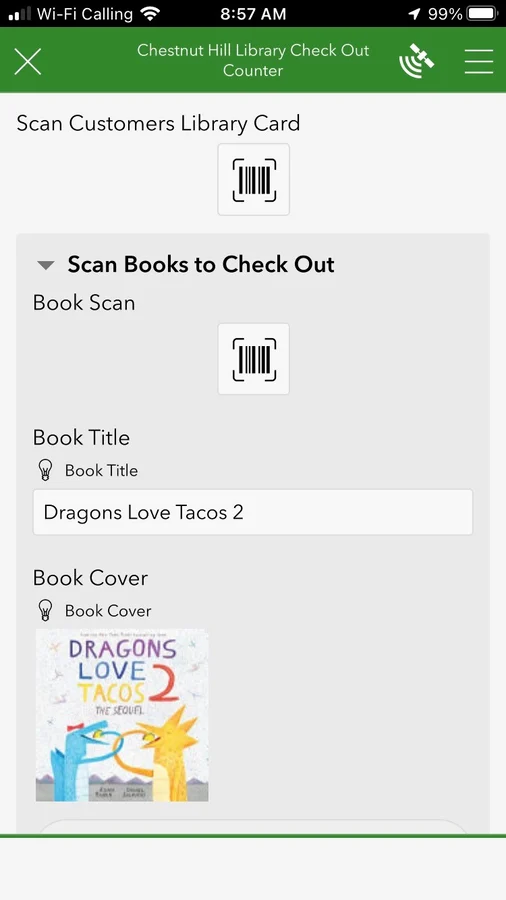
I crafted a survey with several essential fields:
- Patron's Name (Barcode Input)
- ISBN Number (Barcode Input)
- Book Title (String)
- Book Cover (String)
To accommodate the possibility of checking out multiple books, I organized the books into a repeat.
I also designed a JavaScript function to look up book titles and cover art.
How Does the JavaScript Book Lookup Work?
When I created the JavaScript function, my focus was primarily on retrieving the book's title by querying Google's Books API with the ISBN number. I stopped at the title, thinking that it would suffice. However, I also yearned to display the book cover, and I found a simple solution. I created an HTML image link and placed it within the String field. To my delight, it worked both in the form and on the Survey123 webpage.
The outcome? It brought immense joy to the children and perhaps ignited the spark of future geographers. What's even more fascinating, is that this library was up and running before the ArcGIS Server installation was completed!
What Makes Survey123 a Flexible Data Collection Tool?
Survey123 is flexible because it combines no-code form building with support for custom JavaScript, barcode scanning, and repeats, making it adaptable far beyond standard field data collection, as the dymaptic team knows firsthand.
Esri's suite of products has made the task of building and accessing databases easier than ever before. Survey123 is a shining example of this, with its user-friendly interface adding that extra touch of convenience. The barcode input feature is particularly versatile and capable of reading various types of codes, including QR, UPC, and ISBN. For more details, check out this helpful article: Barcode Scanning in Survey123 for ArcGIS.
What JavaScript Code Powers the Book Lookup?
Lastly, I wouldn't leave you without sharing the JavaScript method I used. I employed two methods, each housed in separate JavaScript files within the survey.
Function to Retrieve Book Title by ISBN
// JavaScript function to get the book title by ISBN
function getTitleByISBN(isbn) {
    var xmlhttp = new XMLHttpRequest();
    var url = "https://www.googleapis.com/books/v1/volumes?q=isbn:"
        + isbn + "&key=YOURGOOGLEAPIKEY";
    xmlhttp.open("GET", url, false);
    xmlhttp.send();

    if (xmlhttp.status !== 200) {
        return ("");
    } else {
        var responseJSON = JSON.parse(xmlhttp.responseText);
        if (responseJSON.error) {
            return ("");
        } else {
            if (responseJSON.items[0]) {
                return responseJSON.items[0].volumeInfo.title;
            } else {
                return ("");
            }
        }
    }
}
Function to Retrieve Book Cover as HTML
// JavaScript function to get the book cover and return it as HTML
function getThumbByISBN(isbn) {
    var xmlhttp = new XMLHttpRequest();
    var url = "https://www.googleapis.com/books/v1/volumes?q=isbn:"
        + isbn + "&key=YOURGOOGLEAPIKEY";
    xmlhttp.open("GET", url, false);
    xmlhttp.send();

    if (xmlhttp.status !== 200) {
        return ("");
    } else {
        var responseJSON = JSON.parse(xmlhttp.responseText);
        if (responseJSON.error) {
            return ("");
        } else {
            if (responseJSON.items[0]) {
                return "<img src='"
                    + responseJSON.items[0].volumeInfo.imageLinks.smallThumbnail
                    + "'>";
            } else {
                return ("");
            }
        }
    }
}
In the calculation field, you'll need this data:
To retrieve the book title:
pulldata("@javascript", "getbooktitle.js", "getTitleByISBN", ${BookBarCode})To retrieve the book cover as HTML:
pulldata("@javascript", "thumbnail.js", "getThumbByISBN", ${BookBarCode})Please note that you'll need a Google API Key for this, which you can obtain by following these steps: Google API Key Guide.
What Other Creative Projects Can You Build with Survey123?
So, what's next on the horizon? Dashboards and real-life surveying for kids! Here are a few more creative ideas to consider:
- A grocery store checkout system for scanning produce and groceries.
- A hardware store setup for measuring boards and scanning items.
As you can tell, I'm quite fascinated with scanner functionality. However, I'm eager to hear your thoughts and ideas. What else can you create with Survey123? The dymaptic team would love to hear about your creative projects.
Frequently Asked Questions
Can Survey123 be used outside of traditional GIS workflows?
Yes. Survey123 is built on Esri's ArcGIS platform and is primarily a field data collection tool, but its barcode scanning, JavaScript calculation, and form customization features make it adaptable for many non-GIS use cases. The dymaptic team regularly explores creative applications of Survey123 alongside traditional GIS deployments.
Does Survey123 support barcode scanning?
Yes. Survey123's barcode input field supports QR codes, UPC barcodes, and ISBN codes. Scanning can be done using a device camera, making it practical for inventory, library, and retail-style apps built on the ArcGIS platform.
How do you use JavaScript in Survey123 to retrieve external data?
Survey123 Connect supports custom JavaScript files that can be called using the pulldata("@javascript") function in a calculation field. In this project, JavaScript functions queried the Google Books API using an ISBN number to return a book title or cover image dynamically within the form.
What tools did dymaptic use to build the library app?
The app was built using Survey123 Connect, Esri's desktop authoring tool for Survey123 forms. It used barcode input fields, a repeat structure for multiple book checkouts, and custom JavaScript files integrated via the pulldata function to call the Google Books API.
Have a Project in Mind?
The dymaptic team loves hearing about the different projects you are working on, brainstorming solutions with you, and sharing our technical knowledge in the process.