How Do ArcGIS Pro Upgrades Affect Your ArcGIS Pro Add-Ins?
Quick Summary
- ArcGIS Pro Add-Ins are custom .NET tools that extend ArcGIS Pro functionality for organization-specific workflows.
- Upgrading from ArcGIS Pro 2.x to 3.x is a major version change that breaks existing Add-Ins and requires recompilation targeting .NET 6 or later.
- Dymaptic has developed custom Add-Ins for state transportation agencies, city public works departments, and construction management firms.
How Has ArcGIS Pro Evolved Since Its Release?
ArcGIS Pro is a great example of rapid software change. Version 1 was released on January 27, 2015, as the next generation desktop GIS to replace ArcMap; and ArcGIS Pro version 3.3 was just released in May 2024.
In the GIS community, everyone had a unique reaction to opening ArcGIS Pro for the first time after using ArcMap. The redesign of the UI to use a ribbon that is dynamic and contextualized depending on which layer you have selected was perhaps the biggest source of confusion and consternation. For all its purported merits and intuitiveness, everyone felt some dismay as they struggled to locate common GIS functionality they could find in ArcMap within seconds. After the initial shock of using ArcGIS Pro wore off, it became easier to appreciate the new functionality that came along with subsequent version changes.
Navigating the rapid evolution of software changes can be tricky and frustrating. Although upgrading software can bring new functionality, it can introduce potential risk from software bugs and may also make existing functionality obsolete, requiring you to update your workflows.
Let's walk through how software upgrades can impact your ArcGIS Pro Add-Ins, specifically. If you have invested in custom ArcGIS Pro Add-In development with dymaptic or another provider, you should pay particularly close attention to keep your Add-Ins from breaking.
What Are ArcGIS Pro Add-Ins and What Can They Do?
ArcGIS Pro Add-Ins are developed using .NET and can be an excellent approach to extend and tailor Pro to your organization's specific workflows. At dymaptic, Add-In development is a core part of how our software development team helps organizations build tools that fit their existing ArcGIS Pro environment.
You can also entirely tailor how ArcGIS Pro boots up, with an Add-In variant called an ArcGIS Pro Configuration, allowing you to only include the default tabs, tools, and panels that are necessary for specific users, along with your custom tool(s). And since Add-Ins are developed in .NET, at the same version as the rest of ArcGIS Pro, upgrades to Pro may impact them.
What Is Software Semantic Versioning and Why Does It Matter for ArcGIS Pro?
Understanding software versioning rules can be a helpful first step for knowing how an upgrade to ArcGIS Pro may affect your ArcGIS Pro Add-In. ArcGIS Pro uses the software semantic versioning approach, which is a three-part version number to denote both functionality and the level of risk of implementing the change.

Figure 1. Software semantic versioning consists of a three-part number (major, minor, and patch), where each component signals a different level of change and upgrade risk.
A major version change is a breaking change introducing a lot of new functionality and comes with the highest risk since it contains the greatest amount of code changes. A minor version change is non-breaking but introduces new functionality and comes with moderate risk with fewer code changes. And a patch introduces no new functionality but resolves bugs and has the least amount of risk since the code is specifically targeting problems with existing code. Therefore, major version changes require the greatest amount of caution and patches require the least.
How Do You Upgrade ArcGIS Pro Add-Ins Across Major and Minor Versions?
With a clear picture of how semantic versioning works, let's take a closer look at ArcGIS Pro versions and how an upgrade may impact your ArcGIS Pro Add-Ins.
Minor Version Changes
If you have an ArcGIS Pro Add-In developed for ArcGIS Pro v2.x, you can upgrade to the latest version of the 2.x series (v 2.9.12 as of July 2024), and the original Add-In will continue to function.
Similarly, if you have an ArcGIS Pro Add-In developed for ArcGIS Pro v3.x, you can upgrade to ArcGIS Pro v3.3.1 and the original Add-In will still work correctly. Although ArcGIS Pro v3.0 – v3.2 uses .NET 6 and ArcGIS Pro v3.3 uses .NET 8 (Microsoft's latest version of .NET), .NET 8 is a non-breaking change, and the .NET 6 Add-In will continue to work fine in v3.3 (Table 1).
Major Version Changes
But what about an ArcGIS Pro Add-In originally developed for ArcGIS Pro 2.x? Will that continue to work fine in Pro 3.x? The short answer is no, it will not.
Since an upgrade from ArcGIS Pro 2.x to 3.x is a major version change, it is a breaking change meaning that deprecated code will need to be resolved, and the Add-In must be recompiled targeting .NET 6.
Furthermore, if you want to upgrade from v2.x to v3.3, but also want changes made to your Add-In, the code will first need to be migrated from .NET Framework to .NET 6, fixing any breaking changes along the way and then recompiling against .NET 6. Next, it will need to be recompiled against .NET 8, though there won't be any breaking changes to fix. Finally, new .NET code could be written to address the requested changes for ArcGIS Pro v3.3.
| ArcGIS Pro Version | .NET Version |
|---|---|
| 2.2 | .NET Framework 4.6.1 |
| 2.5 | .NET Framework 4.8 |
| 3.0 | .NET 6 |
| 3.3 | .NET 8 |
Table 1. ArcGIS Pro versions and their corresponding .NET versions. The transition from ArcGIS Pro 2.x to 3.x represents the highest-risk upgrade, requiring Add-Ins to be recompiled against .NET 6.
Do ArcMap Add-Ins Work in ArcGIS Pro?
ArcMap Add-Ins cannot be migrated to ArcGIS Pro without a complete rewrite. The ArcObjects code used to develop ArcMap Add-Ins is entirely deprecated in ArcGIS Pro, meaning every component would need to be rebuilt from the ground up.
If this is something you need help with, the dymaptic team can help rewrite your ArcMap Add-Ins or redevelop a new Add-In that matches your specifications.
What ArcGIS Pro Add-Ins Has Dymaptic Built for Clients?
The following examples illustrate the range of custom ArcGIS Pro Add-Ins that dymaptic has built for clients across industries.
Multi-function ArcGIS Pro Toolbar
We developed a custom toolbar for a state transportation agency. The toolbar includes:
- A dock pane with a collapsible, multi-level tree structure of data layers, allowing users to quickly add these layers to the Map tab's table of contents and manage content
- Data layers and map templates which are controlled by a map service, providing GIS Administrators the ability to quickly update the toolbar
- Zoom To tools for quick navigation to specific locations, such as coordinates, mile points, or bridges
- Map tools for multiple functions, including opening Google Street View at a selected point, loading a web page showing the last photograph captured at that mile point, and more.
ArcGIS Pro Configuration
We created a tailored configuration for a city public works department, streamlining the ArcGIS Pro interface by removing unnecessary tabs and tools. The configuration retains essential default functionality while integrating custom tools allowing users to:
- Create point features in bulk by parsing coordinates in various formats from a text file
- Add individual points using a map tool
- Delete points via another map tool
- Access a customized editing environment
ArcGIS Pro Toolbar for Definition Queries
We developed an Add-In for a construction management and inspection firm that efficiently applies definition queries to all layers within a group across multiple maps in a single ArcGIS Pro project. As users add or remove maps or group layers:
- The Dock Pane dynamically updates to reflect these changes
- The tree structure in the Dock Pane displays all maps in the project, along with their group layers
- Users are able to easily input and apply queries to the desired layers
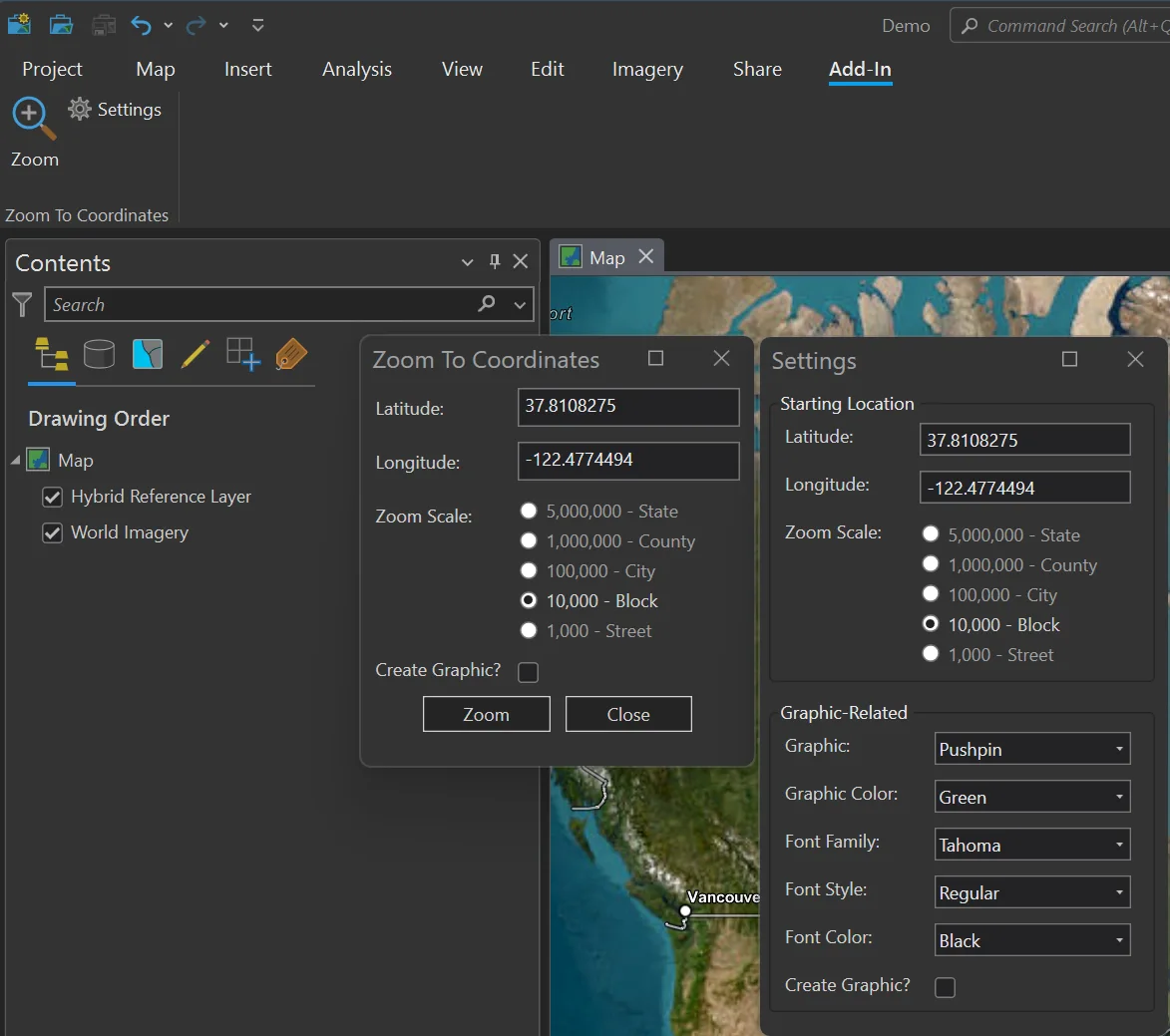
Zoom To Coordinates
I started working on this Add-In to learn more about the functionality of ArcGIS Pro Add-Ins. Once the tool was built, we made it available as a free download from the ArcGIS Marketplace. Zoom To Coordinates:
- Allows users to quickly navigate to specific coordinates on a 2D or 3D map in ArcGIS Pro
- Allows users to optionally create graphics or overlays at the coordinates
- Is highly customizable, with a variety of start-up and graphic-related options
Summary
The team at dymaptic specializes in developing custom ArcGIS Pro Add-Ins, with deep expertise in both GIS and .NET. Whether you need to upgrade an existing Add-In to the latest version of ArcGIS Pro or are ready to build something new, we are ready to help!
Have a Project in Mind?
The dymaptic team loves hearing about the different projects you are working on, brainstorming solutions with you, and sharing our technical expertise in the process.