ArcGIS Hub Basic vs. Premium: What's the Difference?
Hello, fellow GIS enthusiasts! Have you ever wanted to showcase your projects and data while also fostering community engagement? Whether you're unsure where to begin or which tools are the best fit, you've come to the right place. In this post, we'll dive into Esri's ArcGIS Hub platform, highlighting the key differences between Hub Basic and Hub Premium. Here's what sets them apart.
Quick Summary
- ArcGIS Hub is a community engagement platform included with ArcGIS Online that organizes people, data, and tools through information-driven initiatives.
- Hub Basic is available to all ArcGIS Online subscribers and supports unlimited public sites for data sharing and internal collaboration.
- Hub Premium requires a separate license and adds a dedicated Hub Community organization, external member accounts, initiatives, teams, events, and Calls to Action for deeper public engagement.
- Dymaptic holds the Esri ArcGIS Hub Specialty, reflecting hands-on experience deploying and configuring ArcGIS Hub for clients.
- This post covers the key differences between Hub Basic and Hub Premium to help organizations choose the right tier.
What Is ArcGIS Hub?
At its core, the platform is a community engagement tool that organizes people, data, and tools through information-driven initiatives. It aims to maximize data-sharing capabilities, collaboration, communication, and community engagement both internally and with external stakeholders. The key difference between Hub Basic and Hub Premium is the level of community engagement and collaboration offered by the product. So, let's get into it...
What Is Hub Basic, and Who Is It For?
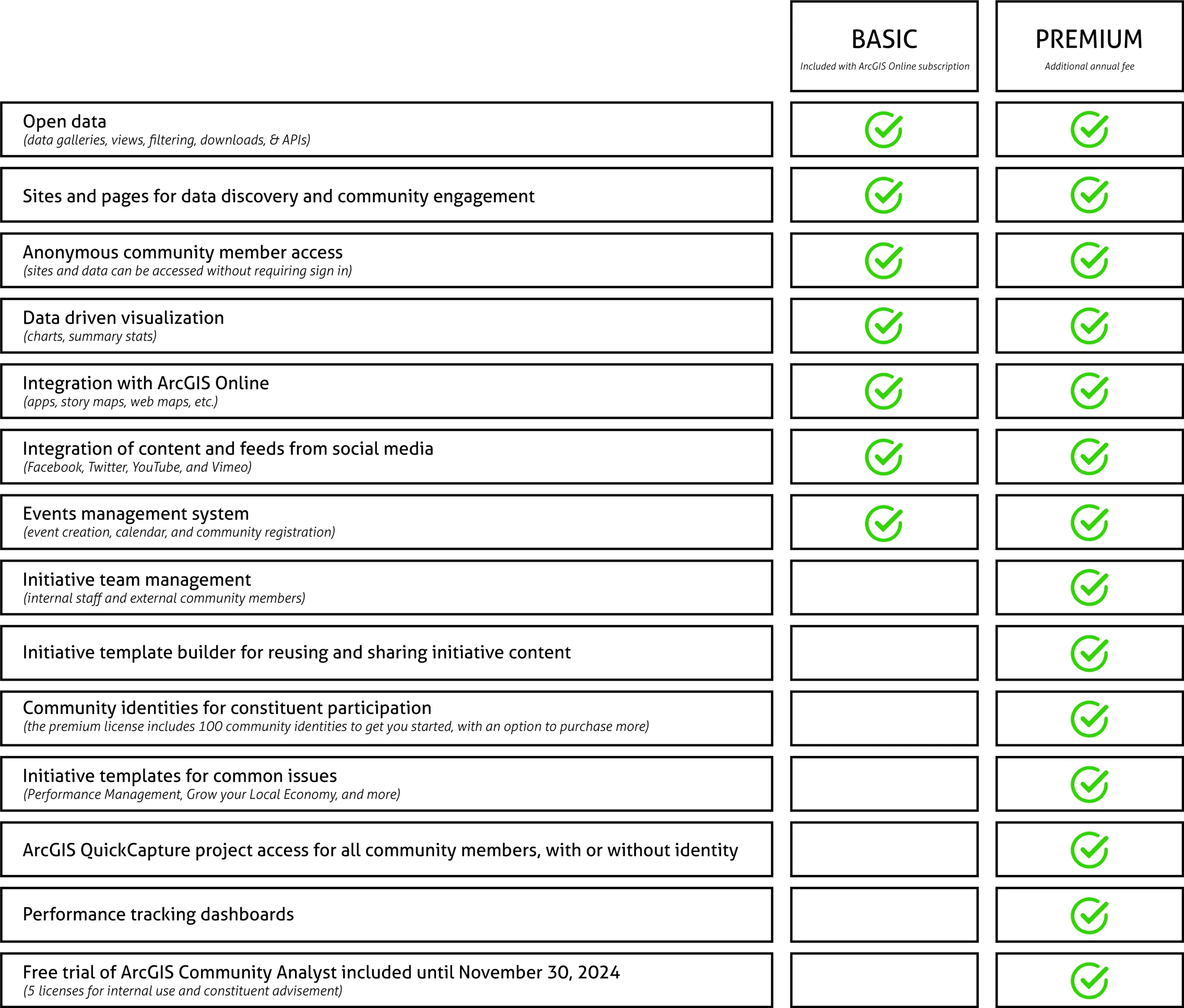
Included with ArcGIS Online subscriptions, Hub Basic is the foundational tier of the Hub platform. It allows organizations to create unlimited sites, which are easy-to-configure, customizable websites (no coding required) that serve as the public face for organizations or specific projects. Sites are great for keeping everything organized in an easy-to-navigate place, including data, maps, and apps. To manage shared content, administrators can create groups to distinguish between data shared within the organization or publicly. In the dymaptic team's experience, these are ideal for organizations that want to present data and other resources by allowing users to view and access content, but do not have a need for extensive community involvement.
What Is Hub Premium, and How Does It Differ from Hub Basic?
Hub Premium builds on the capabilities of Hub Basic and introduces several advanced features geared toward public engagement. A separate license is required to access the capabilities of Hub Premium, with special pricing available for nonprofits and customers with ArcGIS Enterprise Agreements.
Initial Setup: The Hub Community Organization
When you obtain a Hub Premium license, you will be prompted to activate an account for your new ArcGIS Online (AGOL) Hub Community organization, which is different than your ArcGIS Online Employee organization. Think of the AGOL Employee Organization as the parent org, while the Hub Community organization is a separate instance of AGOL specifically for external community accounts used to allow easy public engagement and contribution. Administrators of the Hub Community organization can add and manage external community member accounts and content.
Creating Initiatives
Another difference you may notice is that within Hub Premium, you'll be creating initiatives. Now you may wonder, What's an initiative? Weren't we creating sites in Hub Basic? Yes, but initiatives have different functionality than sites. Initiatives in Hub Premium embrace a broader range of tools for community engagement, project management, and tracking, which includes sites. By default, when an initiative is created in Hub Premium, it is automatically associated with a site that serves as the face of the initiative where you can share your story and display content, just like in Hub Basic.
But it doesn't end there! Since initiatives are designed to provide a high level of interaction by allowing external members of the public to create accounts through your AGOL Hub Community org and actively participate and contribute to an initiative, there are more advanced features to target public engagement. In addition to having unlimited sites associated with your initiatives, there are also teams, events, calls to action, projects, and more components available to leverage, which we'll explore next.
Embracing the Public with External Community Accounts
Hub Premium takes the concept of community engagement to a new level. With the addition of the Hub Community organization, members of the public can use a personal email address to create accounts in the Hub Community org, without needing to be associated with an existing AGOL organization (a useful option for public-facing initiatives). If desired, external members can follow public initiatives and create their own community account directly through your initiative's site home page. Or, if the initiative is not public or administrators want more control over who creates external community accounts, Hub Community admins can create external accounts for community members through the Hub Community AGOL organization. These capabilities allow for easy management and tracking of internal and external members.
What Additional Features Does Hub Premium Include?
Teams
Within an initiative, there are two types of teams, core and supporting, that behave similarly to groups, but are specific to an initiative. By default, an initiative has one core team that gives members edit access to the entire initiative, meaning they can edit the page and all other items as if they are the owner. Any number of supporting teams can be added to an initiative, and they can have either view or edit access. These teams offer great flexibility and the ability to organize both internal and external community accounts, ensuring users have appropriate access to initiative-related content.
Events
Events in Hub Premium are activities or gatherings that are tied to a specific initiative. You can create events to add to maps or calendar views, and community members can sign up or RSVP to these events. They can be used to engage with the community, gather feedback, share information, manage attendance, and track participation. Events can be anything from public meetings, workshops or trainings, volunteer opportunities, or virtual webinars.
Calls to Action
Calls to Action are interactive, goal-oriented elements you can place on your initiative's Hub site to help engage community members with clear prompts, often guiding a user to do anything from following your initiative, RSVP-ing to an event, filling out a survey, or joining a project. They're meant to draw people to your initiative and really tap into community engagement.
Projects
Projects in Hub Premium provide a structured way to organize, track, and communicate progress for initiative goals, including milestones and Calls to Action. Hub Premium also offers project metrics that allow you to track performance, contributions, and impact.
Which ArcGIS Hub Tier Is Right for Your Organization?
The right tier depends on your organization's needs. Hub Basic suits organizations focused on data sharing and internal collaboration. Hub Premium may be a better fit when public engagement, external accounts, and initiative management are priorities.
Frequently Asked Questions
Do I need a separate license for ArcGIS Hub Premium?
Yes. Hub Basic is included with all ArcGIS Online subscriptions at no additional cost. Hub Premium requires a separate license, with special pricing available for non-profits and customers with ArcGIS Enterprise Agreements.
Can external users create ArcGIS Hub accounts without an existing ArcGIS Online subscription?
With Hub Premium, members of the public can create free accounts in the Hub Community organization using a personal email address, without needing an existing ArcGIS Online subscription. Administrators can also create external accounts on behalf of community members directly through the Hub Community organization.
Here at dymaptic, we're honored to hold the Esri Hub Specialty; adding this specialty to our list of credentials shows our team's hands-on experience and deep knowledge of ArcGIS Hub. If you need help with Hub, feel free to contact us. We're here to assist you in making the most of this powerful platform.
Have a Project in Mind?
The dymaptic team loves hearing about the different projects you are working on, brainstorming solutions with you, and sharing our technical expertise in the process.