Broccoli2Shell and ArcGIS: What Pro and Enterprise Admins Need to Patch
It seems like security vulnerabilities are being found about as fast as OpenAI can release math papers these days. It can be hard to keep up with all that is going on, but this one is important!
If You Only Have Five Minutes
- Update the .NET Desktop Runtime on every ArcGIS Pro machine to 10.0.14 (Pro 3.7) or 8.0.33 (Pro 3.3–3.6).
- Update the ASP.NET Core Hosting Bundle on every ArcGIS Web Adaptor (IIS) machine to 10.0.14 or 8.0.33, whichever line you already have. (If you're on Web Adaptor 11.1 and still on 6.x, move to 8.0.33.) Then restart IIS.
- Check whether your ArcGIS Server machines have .NET Extension Support installed. If they do, update the .NET Desktop Runtime there too. Some of Esri's own server extensions need it, so don't assume it's not there just because you've never written an SOE.
- If you're on Pro 3.0–3.2, or Server 11.0–11.2 with .NET Extension Support, plan an ArcGIS upgrade. These versions run on .NET 6, which went out of support on November 12, 2024 and won’t be getting a fix.
- To patch Python in ArcGIS, you’ll need to create a cloned conda environment and update the brotli and brotlicffi packages to 1.2.1 and 1.2.1.0 (or later). If you write your own JavaScript applications or use ArcGIS Experience Builder Developer Edition, you’ll need to update Node.js wherever it is installed. If you run VertiGIS Studio Access Control or Analytics, upgrade them too (to 5.9.1 and 1.8.1).
Last updated October 28, 2026. We'll revise this as Esri and Microsoft publish more.
It can sometimes feel like patching security issues like this is more trouble than it’s worth. As everyone else patches, the risk drops, and the “bad guys” eventually move on. At least that’s how it used to work. Now that the “bad guys” have AI, they can put lots of exploits to work quickly, so get patching!
This one is a bug in Google's Brotli compression library (CVE-2026-111497), and it goes by three different nicknames (is it weird that we give security vulnerabilities nicknames?): Broccoli2Shell, Node2Shell, and HTTP2Shell. Internally we’ve been using Broccoli2Shell, but I admit that I do like to eat broccoli, so I don’t want it to get a bad rap.
Whatever you call it, it's now on CISA's list of vulnerabilities being exploited in the wild, and it's probably sitting somewhere in your ArcGIS setup.
Brotli is buried in a lot of different software, and a typical ArcGIS Pro or ArcGIS Enterprise install includes several copies. One is in the .NET runtime that Pro and Web Adaptor (IIS) run on, and another is in the Python environment that ships with Pro and Server. There's also one in Node.js, whether that's on a developer's machine or bundled inside another vendor's server product.
Esri published guidance on October 27 and is still working through the rest of its product line. As an Esri Gold Partner, the dymaptic team has been patching the ArcGIS machines we support, and we found that the hard part was matching each ArcGIS release to the right runtime and the right installer, so we took some time to write down what we know now.
What Happened with Broccoli2Shell?
The flaw is an out-of-bounds write in Brotli's decoder. If a program decompresses a specially crafted Brotli stream, an attacker can make it write past the end of its memory buffer. That can leak data, crash the process, or, in the worst case, run an attacker's code. Brotli versions 1.0.3 through 1.2.0 are affected.
OpenAI's security researchers found it, and the fixes came out over about a week. Node.js and Google shipped theirs on October 21 (Brotli 1.0.10, 1.1.1, and 1.2.1). Google published the CVE on October 22, and Microsoft put out an off-schedule .NET update on October 25. Then on October 27, CISA added it to its Known Exploited Vulnerabilities catalog. That means CISA has evidence someone is actually using it, and federal agencies have until November 10 to patch.
Google scores it 9.2 out of 10 (Critical) on CVSS v4.0, the standard severity scale. Node.js rates it High.
One clarification: Microsoft says .NET Framework 4.x isn't affected. Modern .NET (8, 9, and 10) is, and that's what current Pro and Enterprise releases use.
Am I Affected?
If you run any current Pro or Enterprise release on Windows, you likely have a vulnerable copy installed. Some IT organizations are probably already pushing this patch out, so coordinate with them if you manage your own ArcGIS environments.
Whether anything actually feeds it bad data is a separate question (more on that at the end). Here's the short version for each component; the sections below go through each one.
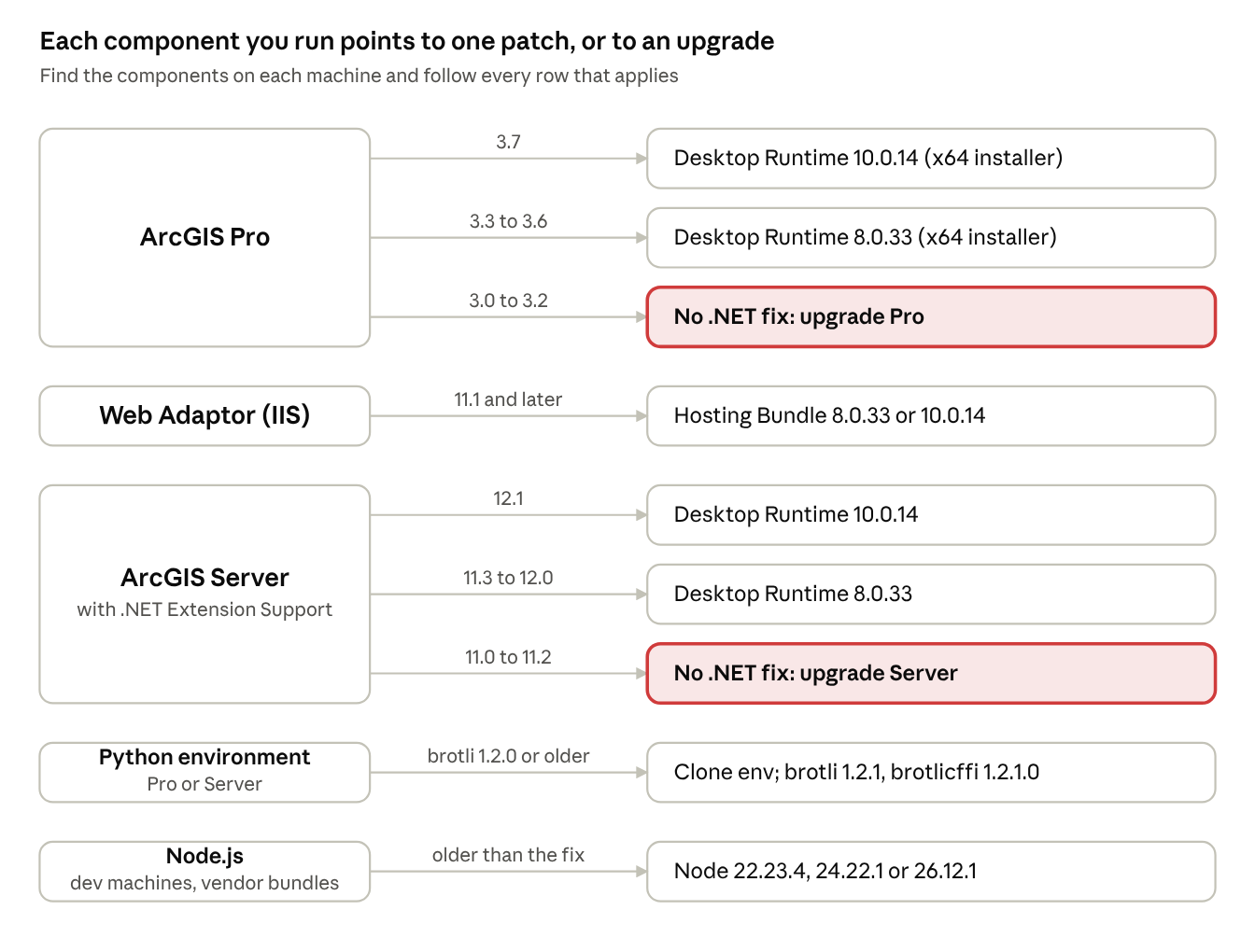
The two red outcomes are the ones a runtime patch can't fix, because those ArcGIS releases run on .NET 6, which is out of support.
The .NET Part: Three Installers That Look Alike
Microsoft fixed this in .NET 8.0.33, 9.0.22, and 10.0.14. The catch: Microsoft's download page has several installers for each version, and installing one doesn't update another. We hit this ourselves. We installed ".NET Runtime 10.0.14" on a Pro machine, and Pro kept right on using the old "Windows Desktop Runtime 10.0.11" next to it.
Match the installer to the name you see under Settings > Installed apps:
| Installed apps entry | What it contains | ArcGIS uses it for |
|---|---|---|
| Microsoft Windows Desktop Runtime | Base runtime plus WPF and Windows Forms | ArcGIS Pro; ArcGIS Server .NET Extension Support |
| Microsoft .NET version - Windows Server Hosting (with Microsoft ASP.NET Core version - Shared Framework) | Base runtime plus ASP.NET Core and the IIS module | ArcGIS Web Adaptor (IIS) 11.1 and later |
| Microsoft .NET Runtime | Base runtime only | Nothing in ArcGIS needs this on its own |
Once you know which one you need:
| Step | Do this | Why |
|---|---|---|
| Download | The x64 installer, not the x64 Binaries zip | The zip unpacks files nothing on the machine will find |
| Install | Run the installer as an administrator on each machine | It registers the runtime system-wide and, in our experience, removes the previous patch of the same product |
| Restart | Close Pro and restart ArcGIS Server | Running processes keep the old runtime until they exit |
| Restart IIS (Web Adaptor machines) | net stop was /y, then net start w3svc, in a maintenance window (iisreset or a reboot also works) |
Until IIS restarts, Web Adaptor can stop serving, and your portal goes down with it |
| Check | Load your portal home page | Confirms Web Adaptor is back |
| Developer machines | Update Visual Studio 2019, 2022, and 2026 | Microsoft patched them in the October 25 updates too |
Which .NET Goes with Which ArcGIS Release
Find your release below and install the patched build of the installer it names. Rows that say "upgrade" have no .NET fix available.
| ArcGIS release | .NET installer | Patched build |
|---|---|---|
| Pro 3.7 | Desktop Runtime 10.x | 10.0.14 |
| Pro 3.3–3.6 | Desktop Runtime 8.x | 8.0.33 |
| Pro 3.0–3.2 | Desktop Runtime 6.x | None; upgrade Pro |
| Web Adaptor (IIS) 12.1 | ASP.NET Core 10.x Hosting Bundle | 10.0.14 |
| Web Adaptor (IIS) 11.2–12.0 | ASP.NET Core 8.x Hosting Bundle (11.3 and 11.5 are also certified on 10.x) | 8.0.33, or 10.0.14 if you've moved to 10 |
| Web Adaptor (IIS) 11.1 | ASP.NET Core 6.x at release; 8.x and 10.x now supported | 8.0.33 or 10.0.14 (move off 6) |
| Web Adaptor (IIS) 11.0 and earlier | No modern .NET | Not affected by this CVE |
| Server 12.1, .NET Extension Support | Desktop Runtime or SDK 10.x | 10.0.14 |
| Server 11.3–12.0, .NET Extension Support | Desktop Runtime or SDK 8.x | 8.0.33 |
| Server 11.0–11.2, .NET Extension Support | Desktop Runtime or SDK 6.x | None; upgrade Server |
| Server 10.9.1 and earlier | .NET Framework 4.x | Not affected by this CVE |
A few notes on that table:
| If you're on… | Know this |
|---|---|
| Web Adaptor 11.1 still on .NET 6 | Esri added .NET 8 support in November 2024. An in-place Hosting Bundle upgrade to 8.0.33 is all it takes |
| ArcGIS Server | Server itself runs on Java, not .NET. .NET only shows up with .NET Extension Support, which custom SOEs/SOIs, the Data Interoperability server extension, and Mapping and Charting Solutions all need |
| ArcGIS Pro | Stay on the major version Pro asks for: 3.7 won't take .NET 11 or later, and 3.3–3.6 ignore .NET 9 and later |
Does Python Need Patching?
Yes, for any Python environment that has the brotli or brotlicffi package installed, not just ArcGIS's. Esri's guidance so far focuses on .NET, but the default arcgispro-py3 environment ships vulnerable versions of both packages, and not just in the newest release. Fixed versions are already on PyPI and on Esri's conda channel, so check your other Python environments too.
| Package (conda name) | Pro 3.7 | Pro 3.3–3.6 | Vulnerable range | Fixed in |
|---|---|---|---|---|
| brotli-python (pip: Brotli) | 1.2.0 | 1.0.9 | 1.0.3–1.2.0 | 1.2.1 (or 1.0.10 / 1.1.1) |
| brotlicffi | 1.2.0.0 | 1.0.9.2 (3.6) | 1.0.3–1.2.0.2 | 1.2.1.0 |
Source: Esri's Pro 3.7, Pro 3.5, and Pro 3.3 Python library lists. Esri doesn't publish a list for ArcGIS Server, but on our Server 12.1 machines the environment has the same 1.2.0 versions as Pro 3.7.
This matters even if you've never imported either package. When either package is installed, the requests package asks servers for Brotli compression and decompresses it automatically, so any script that calls a web service can hit the bug.
The default arcgispro-py3 environment is read-only, so until Esri ships an update:
| Do this | How | Watch out for |
|---|---|---|
| Clone and patch | Clone the default environment, run pip install -U "brotli>=1.2.1" "brotlicffi>=1.2.1.0" in the clone, and make it active. Do the same for ArcGIS Server if your services run Python |
brotlicffi 1.2.1.0 rejects trailing bytes after a Brotli stream, so run your scripts' tests |
| Turn off Brotli in your own scripts | Pass headers={"Accept-Encoding": "gzip, deflate"} on requests calls |
Cuts exposure but doesn't eliminate it. A misbehaving server can send Brotli anyway |
| Watch Esri's post | Check for a patched default environment |
Does Node.js Need Patching?
Node.js is the program that runs JavaScript outside a web browser, and most web developers use it to build and test their apps. It's also where this bug first showed up. ArcGIS Pro and ArcGIS Server don't need it, but developer machines usually have it: Experience Builder Developer Edition runs on Node.js, and so do most other web app builds. Some vendor products bundle their own copy too. Patch it outside your normal cycle:
| Release line | Upgrade to |
|---|---|
| 26.x | 26.12.1 or later |
| 24.x | 24.22.1 or later |
| 22.x | 22.23.4 or later |
| 20.x and older | No fix (20.x reached end of life April 30, 2026); move to 22, 24, or 26 |
VertiGIS Studio and Other VertiGIS Products
A lot of Enterprise shops run VertiGIS on the same servers. VertiGIS has a general advisory (in German) and a VertiGIS Studio article, both updated October 28, 2026:
| Product | Status | What to do |
|---|---|---|
| Studio Access Control | Affected (bundled Node.js) | Upgrade to 5.9.1 |
| Studio Analytics | Affected (bundled Node.js) | Upgrade to 1.8.1 |
| Studio Web, Mobile, Workflow, Item Manager, Search, Reporting; VertiGIS Inline | Not affected | Nothing |
| Studio Printing (on-premises) | Not affected; it runs on .NET Framework 4.8 | Its Printing Engine runs as a Pro-based geoprocessing task on your Server, so patch Server's Python |
| Studio Desktop | Runs inside ArcGIS Pro | Patching Pro's Desktop Runtime covers it |
| 1Integrate, 1Data Gateway, 1Engage, 1Streetworks, 1SMS, 1Edit, WebOffice, EDP Future, EDP Vision, EDP Mobile | Not affected | Nothing |
| LM/3A/DAVID, VertiGIS FM | Listed as affected product families, with details on separate VertiGIS pages | Check VertiGIS's pages for those products |
"Not affected" only covers VertiGIS's own code. The Windows Server, IIS, and ArcGIS Enterprise underneath still need the patches above. VertiGIS also says no exploitation is known, but CISA listed it as exploited on October 27, so don't wait.
What About Custom Apps You've Had Built?
This one is easy to miss. If you have custom apps (a self-contained .NET app, something running in a container, or anything that ships its own copy of Node), patching the underlying server won’t necessarily fix them. They can carry their own copy of the decoder until someone rebuilds and redeploys them on a patched runtime. If a vendor or a partner (hi, that's us!) built it for you, ask them whether it's been rebuilt.
How to Check Your Machines
Run these on each Pro workstation and each Enterprise server:
| What you're checking | How | What needs work |
|---|---|---|
| Every .NET runtime | dotnet --list-runtimes |
Microsoft.WindowsDesktop.App or Microsoft.AspNetCore.App below 8.0.33, 9.0.22, or 10.0.14 in its line; anything on 6.x |
.NET, if dotnet isn't found |
Settings > Installed apps, search ".NET" | Same versions. No entries usually means no .NET |
| Server .NET Extension Support | Installed apps > ArcGIS Server > Modify | Whether the feature is installed |
| Node.js | node --version |
Below 22.23.4, 24.22.1, or 26.12.1; any 20.x or older |
| Python | conda list brotli in the ArcGIS Python Command Prompt |
brotli-python below 1.2.1, brotlicffi below 1.2.1.0 |
To find copies of Node.js that a vendor installer bundled (VertiGIS or anything else), run this in PowerShell on each server. Anything below the patched builds above needs a vendor update:
Get-ChildItem 'C:\Program Files', 'C:\Program Files (x86)' -Recurse -Filter node.exe -ErrorAction SilentlyContinue |
    ForEach-Object { '{0}  {1}' -f (& $_.FullName --version), $_.FullName }
Don't replace a bundled node.exe by hand. Get the fixed build from the vendor so you stay supported.
Mistakes to Avoid
| Mistake | Fix |
|---|---|
| Installing ".NET Runtime" instead of "Windows Desktop Runtime" | If Installed apps shows two 10.x entries with different names, get the installer whose name matches the old one |
| Assuming a server has no .NET | Esri server extensions can bring in .NET Extension Support, so check |
| Grabbing the Binaries zip | Use the x64 installer on Windows Server |
| Skipping the restart | Restart ArcGIS Server, IIS, and any open Pro sessions. IIS is the one that takes your portal down |
| Stopping at .NET | Python and Node.js copies of Brotli need patching too |
What We Don't Know Yet
| Open question | What we'd do now |
|---|---|
| Does ArcGIS code actually use the vulnerable .NET paths? (In .NET they're off unless an app turns them on.) Esri hasn't said | Patch anyway |
| When will Esri ship a patched Python environment for Pro and Server? | Use a patched clone |
| Do Portal, Data Store, Notebook Server, or other Esri components bundle Brotli? Esri is still investigating | Watch Esri's post |
| Which VertiGIS LM/3A/DAVID and VertiGIS FM versions are affected, and what fixes them? | Check VertiGIS's pages for those products |
If you learn something we've missed, and we'll update this post. And if you're not sure what's actually running in your stack, . The dymaptic team is happy to help you sort it out, or just jump on a call to chat!
Sources
- Esri: Brotli Vulnerabilities (Broccoli2Shell)
- CISA: two vulnerabilities added to the KEV catalog, October 27, 2026
- CVE-2026-111497 record
- Microsoft: .NET October 2026 Out-of-Band Security Updates
- dotnet/announcements #496
- Esri: ArcGIS applications moving to .NET 10
- Esri: Web Adaptor 11.1 on .NET 6 and .NET 8
- Esri: Web Adaptor on .NET 10
- ArcGIS Pro 3.7 system requirements
- ArcGIS Pro 3.5 system requirements
- ArcGIS Server 11.3 system requirements
- ArcGIS Data Interoperability server extension requirements
- Aikido: Python packages affected
- Node2Shell reaches Python (requests behavior)
- SecurityWeek: CISA warns of Node2Shell exploitation
- VertiGIS: Brotli decoder vulnerability advisory (German)
- VertiGIS Studio Printing: release notes (.NET Framework 4.8 requirement)
- VertiGIS: Latest information about Brotli vulnerability CVE-2026-111497 in VertiGIS Studio products
- Beazley Security: Node.js Brotli decoder advisory
- ArcGIS Pro 3.7 Python libraries
- ArcGIS Pro 3.5 Python libraries
- ArcGIS Pro 3.3 Python libraries
Header image broccoli: Noto Emoji by Google, used under the Apache License 2.0.
Frequently Asked Questions
What is Broccoli2Shell (CVE-2026-111497)?
Which .NET update does ArcGIS Pro need for Broccoli2Shell?
How do I patch ArcGIS Web Adaptor (IIS) for Broccoli2Shell?
Does the ArcGIS Python environment need patching for Broccoli2Shell?
Need Help Patching Your ArcGIS Environment?
The dymaptic GIS administration team can inventory what's running on your Pro workstations and Enterprise servers, patch it, and confirm your portal comes back up.