7 Features We Love in the New ArcGIS Online Map Viewer Beta
If you've used ArcGIS Online recently, you may have noticed a new option when you're opening a map: Open in Map Viewer Beta. Esri has been working hard the last couple of years on redesigning the ArcGIS Online Map Viewer. There are a few new features that have the dymaptic team very excited, and we wanted to share them with you.
Quick Summary
- ArcGIS Online is rolling out a redesigned Map Viewer Beta with several long-requested features.
- Group layers, multiple labels, and popup docking are among the most significant additions for GIS professionals.
- The new viewer offers instant preview for all map edits, reducing guesswork and improving the editing experience.
- Improved bookmarks now support thumbnails, rotation, and extent editing.
- Dymaptic is tracking development of the Map Viewer Beta and will post updates as new features roll out.
What Makes Group Layers Such a Big Deal in ArcGIS Online?
The first and most exciting feature is group layers!
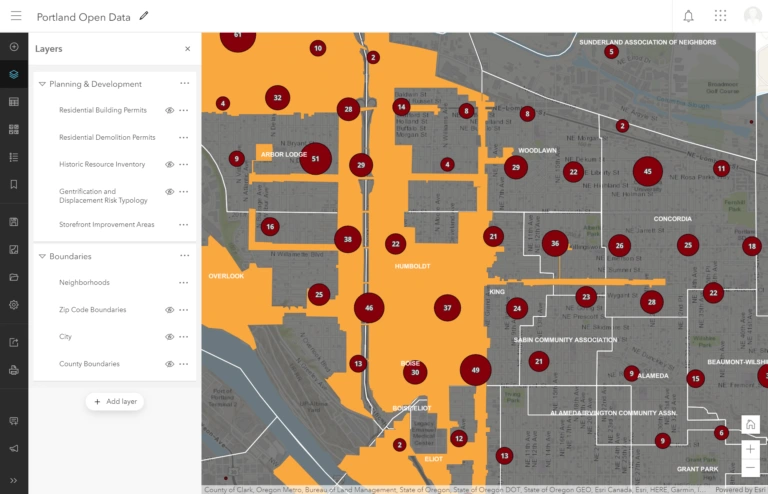
I should have probably left the best for last, but I've never been the patient type. Group layers in ArcGIS Online has been one of the most requested features on the ArcGIS Ideas page. And they're finally here. You can create groups and re-arrange your map layers for a more user-friendly experience.
Why Is Popup Docking a Welcome Change in the Map Viewer Beta?
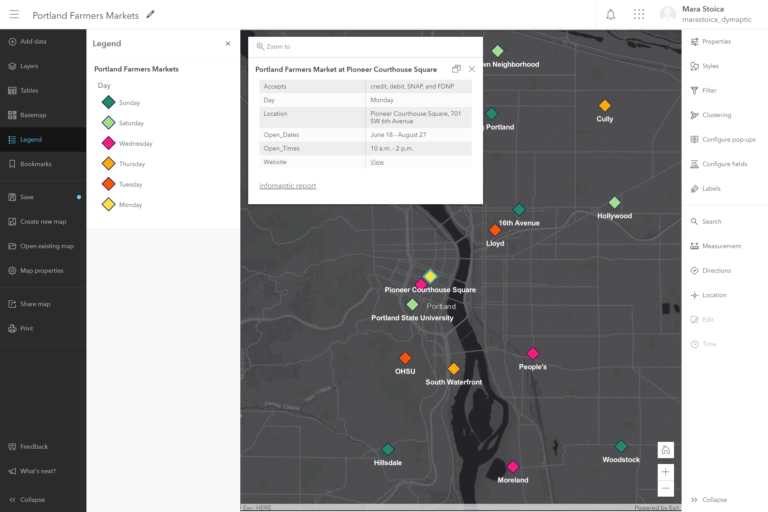
Popup docking is another personal favorite feature of mine. The behavior of the popup in the Map Viewer Classic is ideal for smaller popups. With larger popups, being able to dock them allows for better utilization of the map.
How Does the New Map Viewer Beta Handle Multiple Labels?
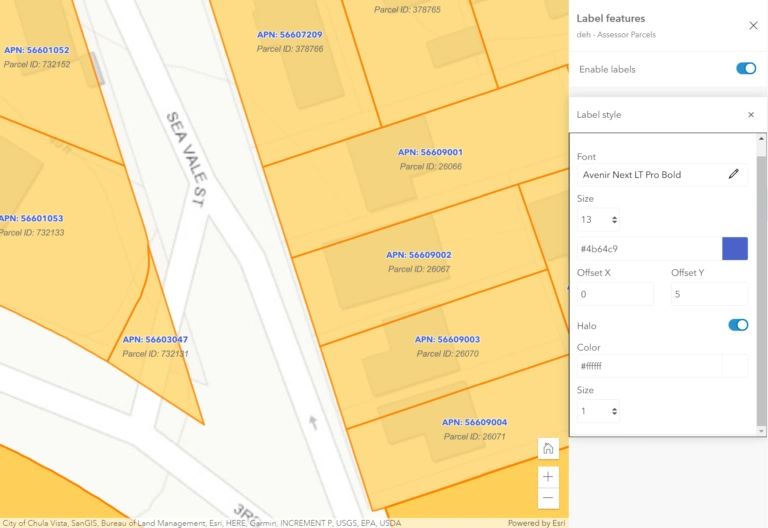
The ability to add multiple labels is another much-requested improvement to the ArcGIS Online Map Viewer. Labels are a challenging feature, as their placement is dependent on so many factors. An ill-placed label can ruin an otherwise beautiful map. In ArcGIS Online, labels have been second-class citizens until now. We don't expect ArcGIS Online labels will ever reach Maplex levels, but it's very nice to see that they're being given some attention.
What Is Instant Preview in the New ArcGIS Online Map Viewer Beta?
In the new Map Viewer Beta, any changes you make to labels, symbology, styles, filters, etc. are immediately reflected on the map. This makes for a much more enjoyable experience editing your maps. And it's a lot easier to undo a small change if you don't like it. The instant preview for popups is a particular favorite at dymaptic. Now you can see exactly what your popup will look like as you are editing it.
How Have Bookmarks Improved in the ArcGIS Online Map Viewer Beta?
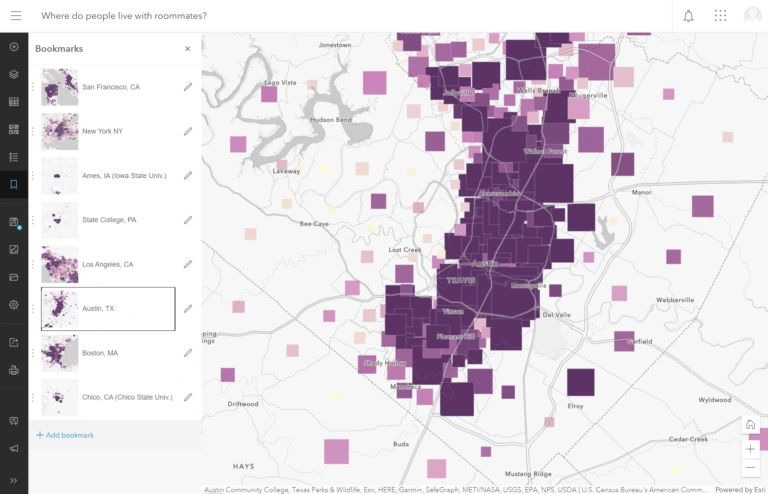
In the new Map Viewer Beta, bookmarks got a significant upgrade. In addition to being able to edit a bookmark's title, now you can set a thumbnail and edit its extent, scale, and rotation. And in case you were wondering, yes, you can now rotate the map. Because who doesn't want to look at the world upside down every once in a while.
Can You Browse Existing Webmaps Without Leaving the Map Viewer Beta?
Ever had to search for an existing webmap while you were working on one webmap? Yep, so have we, and it can be frustrating. You have to open ArcGIS Online in a new tab, go to content, filter it, and scroll through all the content until you find your webmap. In the new Map Viewer Beta, you can see all existing webmaps in a side panel without leaving the active map viewer. You can even select a webmap to view its properties. Hopefully, we'll be able to view two maps side by side soon as we can in ArcGIS Pro.
How Does the Map Viewer Beta's Design Improve the Overall Experience?
The modern look and feel may not necessarily count as a feature, but nonetheless, it makes the overall experience of using the map viewer much more enjoyable, and we love that. The new Map Viewer Beta is better laid out, with toolbars and panels that collapse to allow for more map real estate. Given the multitude of supported data sources, adding data is a confusing process. The new Map Viewer Beta adds clarity by separating the data sources.
What's Next for the ArcGIS Online Map Viewer Beta?
The ArcGIS Online Map Viewer Classic was a wonderful tool, and it has served the Esri community well for many years. Esri has announced that the Map Viewer Classic will remain in place until the new Map Viewer Beta achieves feature parity. If you'd like to learn more about the development progress and perhaps submit your own ideas visit Esri's ArcGIS Map Viewer Beta Community Page. Check back with the dymaptic blog for updates as new features roll out.
Have a Project in Mind?
The dymaptic team loves hearing about the different projects you are working on, brainstorming solutions with you, and sharing our technical expertise in the process.